
Settings
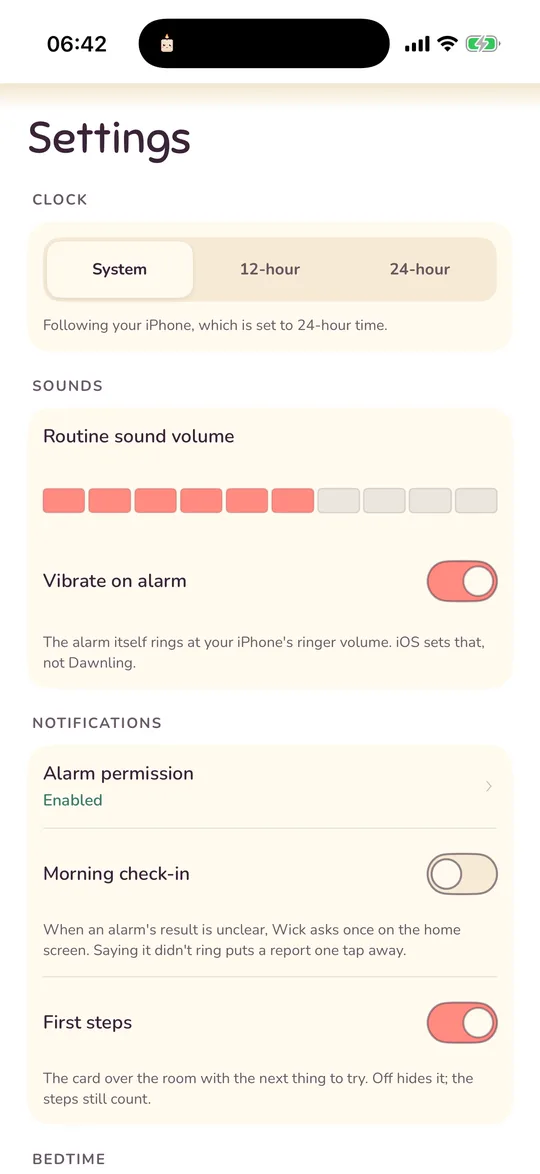
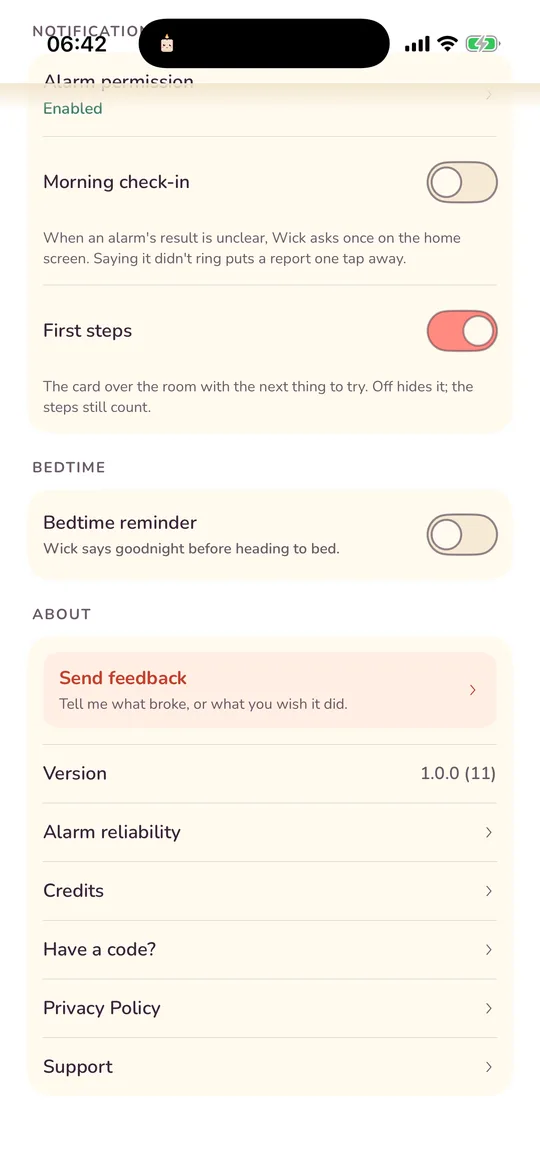
Settings is short on purpose. Here is every row, in the order it appears.
Clock
Time format: System, 12-hour or 24-hour. Every time in the app follows it, including the wheels in the alarm editor and the widgets.
Sounds
- Routine sound volume and Vibrate on alarm. The alarm itself rings at your phone's ringer volume on iPhone; iOS sets that, not Dawnling.
- Alarm volume (Android only): the alarm rings at this level, then your phone's own alarm volume comes back.
Notifications
- Alarm permission. Shows Enabled, Disabled or Not set up yet, with an Enable button. Once granted, tapping the row opens the phone's own settings page for Dawnling. On Android this card is called Alarm reliability and lists exact alarms, notifications, unrestricted battery and the full-screen alarm, each with a button to the right place.
- Morning check-in. When an alarm's result is unclear, Wick asks once on the home screen whether it woke you. Saying it didn't ring puts a report one tap away. On by default; see the check-in.
- First steps. Only while the list is still active. Off hides the card over the room; the steps keep paying.
Bedtime
- Bedtime reminder. Wick says goodnight before heading to bed, as one ordinary notification. It needs notification permission the first time; if that is off in the phone's settings, the switch opens them.
- Reminder time. 22:00 to begin with. This is also Wick's bedtime in the room, reminder on or off. See Wick's bedtime.
About
- Send feedback. Four doors: the alarm did something wrong (copies the reliability report so you can paste it), something looks off, an idea, or something else. Each opens the feedback page in a browser view with the app version filled in. The app sends nothing itself.
- Version. Handy to quote in a message.
- Alarm reliability. The on-device log of what your alarms did. See the reliability log.
- Credits. Every track with its artist, marked where AI-generated, and the icon sets.
- Have a code? Redeem a gift code. See codes.
- Privacy Policy and Support open this site and an email.
What is not in Settings
- No account, no sign-in, no restore purchases. There is nothing to restore; the app is free and everything lives on the phone.
- No dark mode switch. The room follows the clock instead, and the app is light throughout.
- No analytics switch. There is nothing to switch off. See Your data.
- Snooze, sound and missions are per alarm, in the editor, not global.
Not answered here? Email and a person reads it, usually the same day.
hello@dawnling.app