
Getting started
The first evening takes about a minute. Here is what each screen asks and why.
Onboarding
Dawnling opens on a sleeping Wick. Begin wakes the candle, and the next screens set up your first morning. Everything chosen here can be changed later from the alarm editor.
- The alarm. A time wheel (07:00 to start) and the days of the week, with weekdays already picked.
- "Some mornings come harder than others." Wake me gently but firmly gives the alarm a short wake mission, a sentence to type before the alarm goes quiet. I rise easy sets no mission. Either way, any alarm can have a different task later.
- The mission (only after the firm answer): typing, maths, candles, odd one, sort or random. The ? next to each one plays a short clip of it. See Wake missions.
- The routine. Yoga, reading, meditation, workout, journaling, or no routine. A few minutes with Wick right after the alarm. Skipping one on the day costs nothing.
- The tuck-in. A three-scene storybook of the morning you just set, ending with Wick asleep. On iOS 26 it points out that the phone shows Snooze and I'm up first, and that any side button stops the sound.
The one permission
When the story ends, the phone asks for the permission the alarm needs. Which one depends on the phone:
- iOS 26 or later: Allow Alarms. This is Apple's alarm permission, separate from notifications.
- iOS 17 and 18: notifications, including Time Sensitive.
- Android: notifications (Android 13+), then exact alarms and the full-screen alarm from the reliability card in Settings.
If you decline, Dawnling still saves the alarm, but a banner on the home screen says Wick couldn't set your alarm until the permission is granted. Tapping the banner goes to the right switch. The full checklist per phone is on Alarm reliability.
The free piece
The first thing Wick does is point you at the shop: one piece in there has no price, the round tree painting. Make it yours hangs it in the room. Everything else in the shop costs dewdrops, the blue drops on each card, and dewdrops come only from mornings. Skip the tour leaves the free piece free; collect it whenever.
First steps
A card over the room lists seven things to try, in any order. Each one pays a few dewdrops when it happens, whether or not you used the card to get there, and the whole list is worth 80.
| Step | Dewdrops |
|---|---|
| A first piece from the shop | the piece itself |
| The alarm, made yours (edit it or set another) | 10 |
| A routine after waking | 10 |
| A first morning, woken | 25 |
| A Pomodoro with Wick (a Focus session) | 15 |
| Wick on the Home Screen (a widget) | 10 |
| A piece moved or swapped from the chest | 10 |
Tapping the card opens the list with a Show the way button on each row. When all seven are done the card leaves for good. To hide it earlier, use Settings → Notifications → First steps; the steps keep paying while hidden.
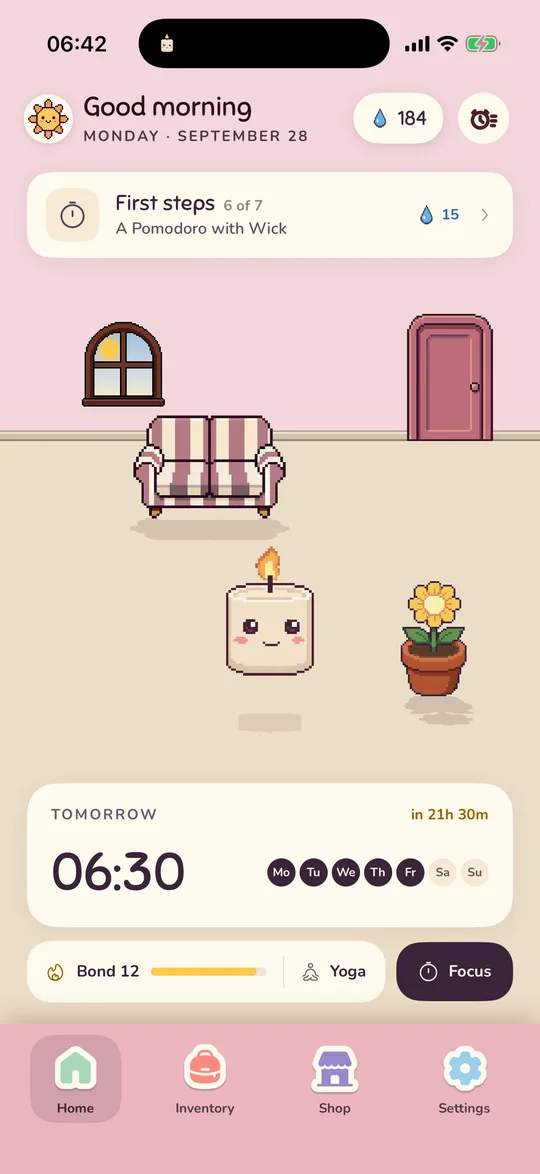
The four tabs
- Home: the room, Wick, the next alarm, the bond with Wick, and the Focus button. See Wick and the room.
- Inventory: the chest with everything you own. Tap a piece to put it in the room. See Shop and inventory.
- Shop: furniture and colours, priced in dewdrops.
- Settings: clock format, sounds, notifications, bedtime, and the About section with feedback, reliability and codes. See Settings.
The alarm list is the alarm-clock button at the top right of Home, or a tap on the alarm card. See Alarms.
Not answered here? Email and a person reads it, usually the same day.
hello@dawnling.app